
Managed vs Unmanaged Languages
Programs want to build and manipulate data in memory
- Arrays, Lists, Trees, Graphs, etc.
But you can quickly “run out of space” …
Manual Memory Management
Unmanaged languages (e.g., C, C++)
- You write
allocandfreein their code - Pro: More control over memory usage and performance
- Con: Bugs! Leaks, dangling pointers, buffer overflows, use-after frees, etc.
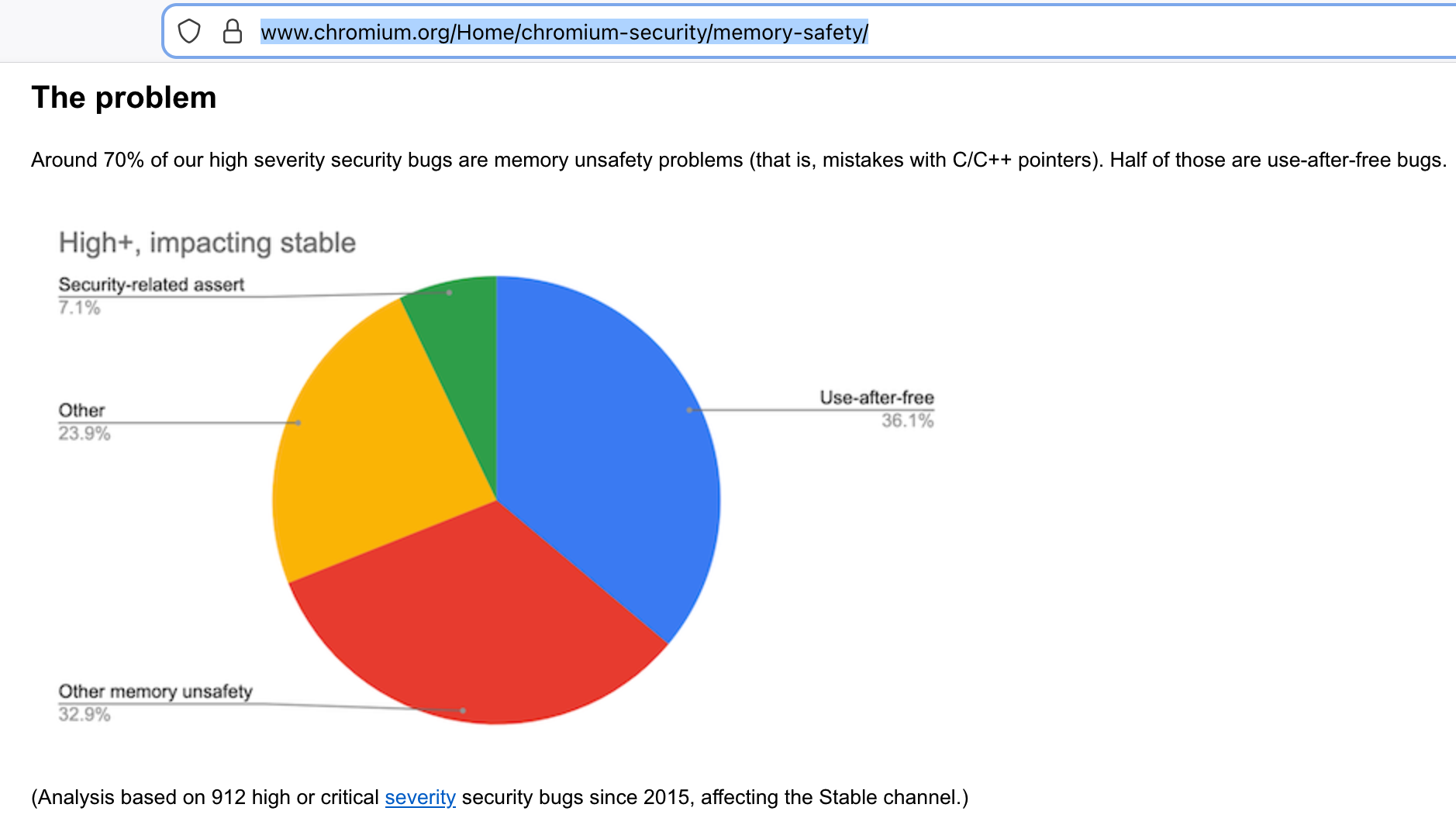
- Memory bugs are 70%+ of security vulnerabilities reported by Microsoft and Google Chromium
Automatic Memory Management
Managed languages (e.g., Python, Java, Haskell) have garbage collection
- The runtime automatically finds and reclaims unused memory
- Pro: Easier to write correct code; just create data, forget about it
- Con: Performance overhead; unpredictable pauses for GC
Performance overhead precludes systems like browsers, OS kernels, drivers, etc.
Automatic Memory Management without Garbage Collection?

Based on a long history of how to track pointers …
Linear Types can Change the World!, Wadler 1990
Region-based Memory Management, Tofte and Talpin 1997
Ownership types for flexible alias protection: Clark, Potter, Noble, Vitek 1998 ECOOP98, OOPSLA98
Region-based Memory Management in Cyclone: Grossman, Morrissett, Jim, Hicks, Wang, Cheney PLDI02
Lots of Haskell/FP inspired features …
Rust is Widely Used …
Systems code: Microsoft, Google, Facebook, Amazon, Dropbox, Cloudflare, etc.
Python ecosystem:
uv,polars…
Goal Today: Rust Basics
- Programs
- Basic Types
- Variables
- Expressions
- Functions
- Control Flow
Starting a Project with cargo
$ cargo new rust-230
$ cd rust-230
$ more src/main.rs
Generates a Cargo.toml file for managing dependencies and a src/main.rs file
fn main() {
    println!("Hello, world!");
}
Compile with cargo build, run with cargo run
$ cargo run
   Compiling rust-230 v0.1.0 (/Users/rjhala/teaching/230-wi26/static/rust/rust-230)
    Finished `dev` profile [unoptimized + debuginfo] target(s) in 0.72s
     Running `target/debug/rust-230`
Hello, world!
Goal Today: Rust Basics
Programs:cargo new,cargo build,cargo run- Basic Types
- Expressions
- Variables
- Functions
- Control Flow
Basic Types, Variables, Expressions
fn main() {
    println!("Hello, world!");
    // signed 32-bit int
    let x: i32 = 42;
    // 64-bit (double precision float)
    let y: f64 = 3.14;
    // boolean
    let z = true;
    // tuple
    let tup = (x + x, y * y, z || false);
    println!("tup = {:?}", tup);
}
When you run it you get
$ cargo run
   Compiling rust-230 v0.1.0 (/Users/rjhala/teaching/230-wi26/static/rust/rust-230)
    Finished `dev` profile [unoptimized + debuginfo] target(s) in 0.42s
     Running `target/debug/rust-230`
Hello, world!
tup = (42, 3.14, "world")
Goal Today: Rust Basics
Programs:cargo new,cargo build,cargo runBasic Types:i32,f64,bool, tuples- Expressions
- Functions
- Variables
- Control Flow
Functions
Here’s a really simple function that computes the nth Fibonacci number
fn fib(n: usize) -> usize {
    if n <= 1 {
        n
    } else {
        fib(n - 1) + fib(n - 2)
    }
}NOTE: No return keyword needed; last expression is the return value
We can call it from main
fn main() {
    let n = 5;
    let result = fib(n);
    println!("fib({}) = {}", n, result);
}
Goal Today: Rust Basics
Programs:cargo new,cargo build,cargo runBasic Types:i32,f64,bool, tuplesExpressions: arithmetic, boolean, tuplesFunctions:fn name(x1:t1,...,xn:tn) -> ret { <expr> }- Variables
- Control Flow
Using Variables in Functions
We can use a local variable res to store intermediate results
fn fib(n: usize) -> usize {
    if n <= 1 {
        n
    } else {
        let res = fib(n - 1);
        res = res + fib(n - 2);
        res
    }
}
But…
Variables are Immutable by Default
Cannot reassign to an immutable variable res
error[E0384]: cannot assign twice to immutable variable `res`
 --> src/main.rs:7:9
  |
6 |         let res = fib(n - 1);
  |             --- first assignment to `res`
7 |         res = res + fib(n - 2);
  |         ^^^^^^^^^^^^^^^^^^^^^^ cannot assign twice to immutable variable
  |
help: consider making this binding mutable
  |
6 |         let mut res = fib(n - 1);
| +++Fix: Declare res as mutable with mut
fn fib(n: usize) -> usize {
    if n <= 1 {
        n
    } else {
        let mut res = fib(n - 1);
        res = res + fib(n - 2);
        res
    }
}
Goal Today: Rust Basics
Programs:cargo new,cargo build,cargo runBasic Types:i32,f64,bool, tuplesExpressions: arithmetic, boolean, tuplesFunctions:fn name(x1:t1,...,xn:tn) -> ret { <expr> }Variables:let(immutable) vslet mut(mutable)- Control Flow
Control Flow
Rust has the usual control flow constructs
if, else if, else
which we say already used in fib
Control Flow: while Loops
Plus also some usual ones for looping
fn fib_while(n: usize) -> usize {
    let mut a = 0;
    let mut b = 1;
    let mut i = 0;
    while i < n {
        let temp = a;
        a = b;
        b = temp + b;
        i += 1;
    }
    a
}
Control Flow: for Loops
Plus also some usual ones for looping
fn fib_for(n: usize) -> usize {
    let mut a = 0;
    let mut b = 1;
    for i in 0..n {     // NOTE: `i` is "unused"
        let temp = a;
        a = b;
        b = temp + b;
    }
    a
}
Control Flow: Pattern Matching!
… and pattern matching!
fn fib_match(n: usize) -> usize {
    match n {
        0 => 0,
        1 => 1,
        _ => fib_match(n - 1) + fib_match(n - 2),
    }
}
Goal Today: Rust Basics
Programs:cargo new,cargo build,cargo runBasic Types:i32,f64,bool, tuplesExpressions: arithmetic, boolean, tuplesFunctions:fn name(x1:t1,...,xn:tn) -> ret { <expr> }Variables:let(immutable) vslet mut(mutable)Control Flow:for,while,if,match
Rust Recap: Statements vs Expressions
Statements perform an action but do not return a value
- e.g.,
let x = 5is a statement; binds5tox
- e.g.,
Expressions return values
- e.g.,
5 + 1is an expression that evaluates to6
- e.g.,
Sequencing
e1;e2;e3is ALSO an expression- whose value is that of the last expression
e3
- whose value is that of the last expression
return is an expression that returns a value from a function
- e.g.,
return 5;returns5from the current function - rarely used: instead, the value of the last expression
- e.g.,